Filling In the Sigmafine Balance Quantity Input Tab
The Quantity Input tab contains the selection of input Attributes for the Inventory (tanks), Flow, and Transfer elements in the model. These Attributes contain the measured and corrected measurements, as well as the measured and corrected tolerances on the measurement. The selected values and tolerances will be the inputs to the Sigmafine Reconciliation engine.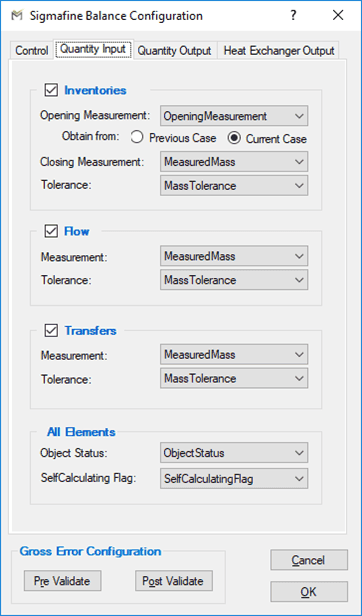
The following tables define the parameters configured on the Quantity Input tab.
Quantity Input Tab – Inventories
| Parameter | Description | Default Attribute Name |
|---|---|---|
| Opening Measurement 1,2 | Select whether the opening measurement is obtained from the previous Case or the current Case and then choose the attribute | OpeningMeasurement |
| Closing Measurement 1 | Closing measured quantity | MeasuredMass |
| Tolerance 1 | Tolerance on the measured quantity | MassTolerance |
| 1 Available only when you check the Inventories checkbox.2 Available only when you select the Current Case option. |
Quantity Input Tab - Flows
| Parameter | Description | Default Attribute Name |
|---|---|---|
| Measurement 1 | Measured quantity of the meter Element attached to the flow. | MeasuredMass |
| Tolerance 1 | Tolerance on the measured quantity. | MassTolerance |
| 1 Available only when you check the Flows checkbox. |
Quantity Input Tab - Transfers
| Parameter | Description | Default Attribute Name |
|---|---|---|
| Measurement 1 | Measured transfer quantity. | MeasuredMass |
| Tolerance 1 | Tolerance on the measured transfer quantity. | MassTolerance |
| 1 Available only when you check the Transfers checkbox. |
Quantity Input Tab, Attribute Tab - All Elements
| Parameter | Description | Default Attribute Name |
|---|---|---|
| Object Status | The Element in-service/out-of-service status | ObjectStatus |
| Self-Calculating Flag | Flag indicates whether Element is set to self calculate. | SelfCalculatingFlag |
Note: If a template is not available in the database for an inventory, flow or transfer, you will not be able to select the checkbox in the corresponding sections (Inventory, Flow, Transfer) of the Quantity Input tab. If you are creating your own templates, refer to section "Sigmafine Balance Analysis Rule Requirements," which defines the exact requirements for the analysis.